How to Improve Website Loading Speed: Practical Steps
Improving Website Loading Speed can make a site feel more trustworthy, easier to use, and more effective at turning visits into enquiries or sales. A fast page also gives mobile users a better experience when their connection is weak, their device is older, or they’re paying for limited data.
The biggest gains usually come from a few measurable changes: reducing image weight, removing unnecessary code, improving server response time, and prioritising the content visitors see first. You’ll learn how to find the slowest parts of a site, fix them in the right order, and keep performance from slipping after a redesign or new marketing campaign.
Start With the Biggest Causes of Slow Pages
The quickest answer is simple: compress and resize images, reduce unused JavaScript and CSS, improve server response time, enable browser caching, and deliver assets through a content delivery network (CDN). These changes often matter more than small code tweaks because they reduce the amount of data a browser must download, process, and display.
Begin by recording a baseline for important page types rather than testing only the homepage. A product page, blog article, checkout screen, and contact form may load very differently because each uses its own images, scripts, fonts, and third-party integrations.
Page load time is not one single event. A browser first connects to the server, receives HTML, discovers additional files, downloads them, builds the page, and then responds to user input, so a page can look visible while still being busy in the background.
Prioritise changes that affect real visitors. A large hero image on a mobile landing page deserves attention before a tiny stylesheet that saves a few kilobytes, while a slow database query deserves attention before a cosmetic font adjustment.
- Identify the five pages that receive the most traffic or generate the most revenue.
- Test each page on mobile and desktop using both a lab tool and real-user data where available.
- Record total page weight, request count, server response time, and Core Web Vitals.
- Fix the largest bottleneck first, then test again before changing another major element.
- Set a performance budget so new images, scripts, and features cannot quietly undo the improvement.
That order prevents a common mistake: spending hours polishing minor details while a single uncompressed banner or poorly configured application is responsible for most of the delay.
Measure Performance With the Right Signals
Use Google PageSpeed Insights as a practical starting point because it combines lab testing from Lighthouse with available field data from real Chrome users. The official Google PageSpeed Insights performance tool can show whether a problem appears consistently in a controlled test, in real browsing conditions, or in both.
Core Web Vitals focus on three user-centred outcomes. Largest Contentful Paint (LCP) measures how quickly the main visible content appears, Interaction to Next Paint (INP) measures responsiveness after an interaction, and Cumulative Layout Shift (CLS) measures unexpected movement on the page.
| Metric | Good result | What commonly harms it |
|---|---|---|
| Largest Contentful Paint (LCP) | 2.5 seconds or less | Slow servers, oversized hero images, render-blocking CSS |
| Interaction to Next Paint (INP) | 200 milliseconds or less | Long JavaScript tasks, excessive scripts, complex event handlers |
| Cumulative Layout Shift (CLS) | 0.1 or less | Images without dimensions, injected adverts, late-loading fonts |
These thresholds are useful targets, not a reason to chase a perfect score at the expense of a useful website. A real shop may choose to keep a payment widget because it produces sales, then improve the timing and loading strategy around that widget instead of removing it blindly.
Lab results are repeatable but simulated, so they can vary with test location, device settings, and network conditions. Field data reflects actual visitors and may reveal that customers in a particular region experience slower response times than your office connection suggests.
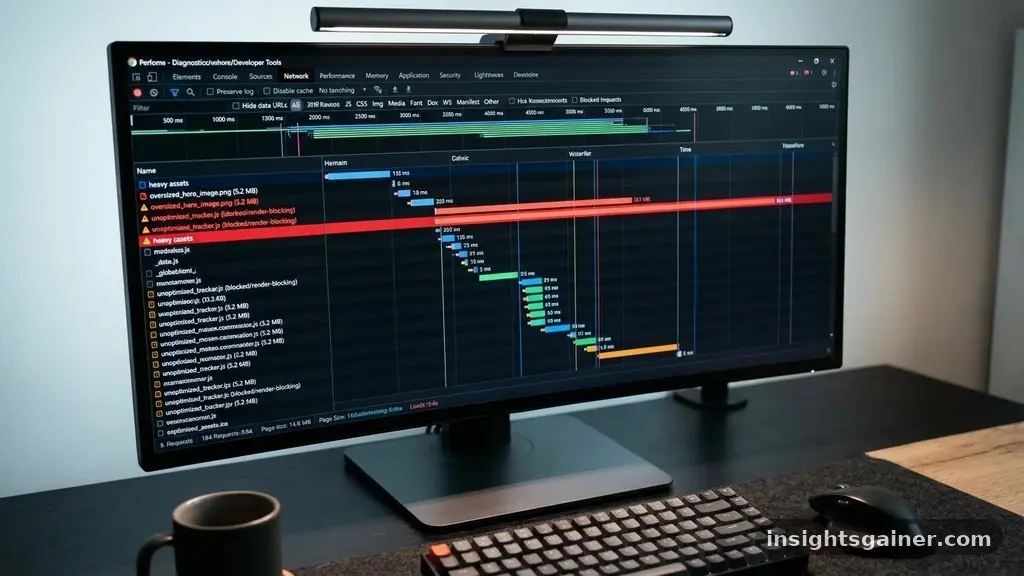
Use the browser’s developer tools to inspect the waterfall as well. It can reveal whether the delay comes from DNS, the initial server response, a blocked stylesheet, a slow API call, or a script that keeps the main thread busy after the page appears.
Reduce Image Weight Without Losing Quality
Images are often the largest contributors to page weight, especially on homepages and editorial sites. Uploading a 4,000-pixel photograph when the page displays it at 800 pixels makes every visitor download data that cannot improve the visible result.
Resize images to the largest display size they actually need, then create responsive versions for smaller screens. The srcset and sizes attributes allow the browser to select a more appropriate file instead of downloading one oversized image for every device.
Choose formats based on the content. WebP is widely supported and usually offers a strong balance between quality and file size, while AVIF can compress some photographs even further but should be tested with your browser support and image-processing workflow.
Compression needs visual judgement rather than a universal setting. A product photograph may tolerate moderate lossy compression, whereas a screenshot containing small text may need a higher-quality export or a different format to remain readable.
Keep important above-the-fold images available early. The main hero image may deserve priority, but that does not mean every image should be marked as high priority; competing downloads can delay the very asset you want visitors to see first.
Images below the initial viewport should use lazy loading, so the browser fetches them as visitors approach that part of the page. Avoid lazy-loading the main LCP image, because delaying the most important visible element can make the page appear slower.
Reserve width and height for every image, including thumbnails and logos. This gives the browser enough information to allocate space before the file arrives, helping prevent layout shifts that can cause a user to tap the wrong button.
A useful image workflow looks like this:
- Crop the original to the composition needed on the page.
- Resize it to the largest expected display dimensions.
- Export a modern format and compare it visually with the original.
- Generate smaller responsive variants for phones and narrow screens.
- Add descriptive alternative text where the image conveys meaning.
- Lazy-load images that appear below the opening viewport.
Image compression is not a one-time task if editors regularly upload new media. Add automatic processing to the content management system so a newly added 10 MB photograph cannot become the next performance problem.
Remove Delays From CSS and JavaScript
A browser must parse HTML, discover stylesheets, build the CSS object model, and combine it with the document before it can reliably paint the page. Large stylesheets and render-blocking resources can therefore delay the first useful view even when the server sends the HTML quickly.
Remove CSS that belongs to deleted components, old campaigns, or plugins no longer used on the site. Critical styles for the initial viewport can be delivered early, while less urgent styles can load later, provided the implementation is tested across browsers and does not create a flash of unstyled content.
Minification removes unnecessary spaces, comments, and characters from CSS and JavaScript. It helps, but it cannot compensate for shipping a large library when the page uses only a small fraction of its features.
Audit JavaScript by function, not just by file size. A tracking script, chat widget, review tool, animation library, or social embed may each look modest alone, yet their combined parsing and execution can keep the main thread occupied during the moment a visitor tries to scroll or tap.
Use defer for scripts that need to run after HTML parsing but do not need to block document construction. Use async carefully for independent scripts because execution order is not guaranteed, which can break code that depends on another file loading first.
Split bundles so visitors download code for the feature they use rather than the entire application. A customer reading an article should not necessarily receive the JavaScript required for an account dashboard, product configurator, or complex checkout flow.
Third-party code deserves special scrutiny because you may not control its server, release schedule, or implementation. Load marketing tags only where they are needed, delay non-essential widgets until interaction, and remove vendors that no longer provide a measurable business benefit.
Be cautious with aggressive optimisation plugins. Combining every file can sometimes reduce request count, but it may also create a larger bundle, damage caching, or introduce JavaScript errors that are more harmful than the original delay.
Improve Server Response and Delivery
Before a browser downloads the page, it waits for the server to respond. A slow time to first byte can come from an overloaded hosting plan, inefficient database queries, uncached pages, distant infrastructure, or application code that performs unnecessary work on every request.
Check server response time separately from front-end weight. If a nearly empty HTML document takes a long time to arrive, compressing its images will not solve the main issue; you may need query optimisation, full-page caching, object caching, or a better hosting configuration.
Enable modern compression for text responses. Brotli often compresses HTML, CSS, JavaScript, and SVG efficiently, while gzip remains useful where Brotli is unavailable, but the server must be configured to send compressed content only when the requesting browser supports it.
Use sensible cache headers for static assets. Files with content-based or versioned filenames can be cached for a long period because a changed filename signals that the browser needs a new copy, while HTML generally needs a shorter or more carefully controlled caching policy.
Browser caching reduces repeat downloads for returning visitors. A person who already has your logo, stylesheet, and common JavaScript in their browser cache should not have to fetch identical files again on every page view.
A content delivery network (CDN) stores or serves static assets from locations closer to visitors. This is particularly useful for a site serving customers across several countries, although a CDN cannot repair slow origin code or oversized files by itself.
Review redirects because each unnecessary hop adds another connection step before the final resource can be requested. A chain from an old URL to an intermediate URL and then to the destination is slower and harder for search engines and browsers to process than a direct redirect.
HTTP/2 and HTTP/3 can improve asset delivery through multiplexing and newer transport behaviour, but protocol support is only one part of the result. The page still needs a reasonable number of files, efficient caching, and a server that can generate responses promptly.
Make Mobile Performance a Primary Target
Mobile performance should not be treated as a smaller version of desktop performance. Phones may use slower processors, limited memory, battery-saving modes, and unstable networks, so JavaScript that feels acceptable on a powerful laptop can make scrolling and tapping feel delayed on a mid-range handset.
Test on an actual phone as well as an emulator. A simulated network can expose transfer problems, while a physical device reveals CPU pressure, touch responsiveness, font rendering, and whether a large page causes the browser to reload or discard content.
Design the first viewport around the visitor’s immediate task. On a service page, that might mean a clear value proposition and contact button; on a shop page, it could mean the product image, price, availability, and purchase control rather than a large decorative animation.
Reduce unnecessary mobile payloads instead of merely shrinking desktop elements with CSS. If a decorative video, background effect, or complex carousel does not help a phone visitor complete the task, serve a simpler alternative or omit it altogether.
Touch interactions also expose JavaScript problems. When a user taps a menu and the interface takes several hundred milliseconds to respond because a long script is running, the page feels broken even if its visual content loaded quickly.
Keep tap targets large enough and stable as the page loads. A late advertisement, banner, or font swap that moves a button can produce both a frustrating interaction and a poor CLS result.
Fonts require restraint. Loading several families and many weights increases requests and transfer size, while a carefully selected system font or a small subset of one webfont can preserve the intended character without delaying readable text.
Use a staged mobile test: load the page on a slow connection, scroll through the main content, open menus, submit a form, and return to the page. This catches problems that a single initial performance score cannot show.
Build a Repeatable Speed Improvement Process
Performance work succeeds when it becomes part of publishing and development rather than a one-off rescue project. A redesigned page may be fast on launch day and slow six months later after new plugins, campaign pixels, images, and embedded media accumulate.
Set a performance budget for page weight, JavaScript, image dimensions, request count, and Core Web Vitals. The budget should reflect the page’s purpose, because a simple article and a feature-rich web application may require different limits.
Measure before and after each meaningful change. If you replace an image format, defer a script, or introduce a CDN, preserve the original result so you can tell whether the change improved LCP, INP, CLS, total transfer, or only a lab score.
Use Lighthouse during development to catch regressions before deployment. Its audits can identify missing dimensions, inefficient images, long main-thread tasks, unused code, and caching issues, but its simulated result should be paired with field data where possible.
Monitor templates rather than individual URLs alone. A CMS change to the article template can affect thousands of pages, while a new product component can slow every item in a catalogue even if only a few pages were manually tested.
Create ownership for third-party scripts. Someone should know why each tag exists, which team uses its data, where it loads, and what would happen if it were delayed or removed.
A practical maintenance cycle can include these steps:
- Review real-user Core Web Vitals each month.
- Test key templates after releases and major content changes.
- Check the largest images and heaviest scripts in performance reports.
- Remove obsolete integrations instead of allowing them to accumulate.
- Investigate significant regressions before they become normal.
Share results in terms that matter to the organisation. A team may respond faster to “the booking page takes longer to become usable on mobile” than to an isolated score, especially when the report connects the delay to abandoned forms or lost enquiries.
Common Mistakes That Waste Performance Work
Chasing a score of 100 is one of the most common distractions. A high laboratory score can coexist with a poor customer experience if real users are far from the server, use older devices, or encounter a slow third-party service that the test did not capture.
Another mistake is enabling lazy loading everywhere. Delaying below-the-fold images is sensible, but delaying the main visible image, logo, or essential interface can worsen the first impression and push LCP later.
Deleting all third-party tools is rarely realistic for a commercial site. Analytics, consent management, payments, customer support, and personalisation may serve important purposes, so the better approach is to load them at the right time and keep only the services with clear value.
Excessive file combination can also backfire. A single enormous JavaScript bundle may reduce request count but force every visitor to download and parse code for features they never use, particularly on mobile.
Do not ignore layout stability while pursuing visual speed. A page that paints quickly but shifts an “Add to cart” button beneath the visitor’s finger can create a worse experience than a slightly slower page with a stable interface.
Finally, avoid making several major changes at once. If you replace the hosting provider, redesign the hero section, install a new optimisation plugin, and alter script loading in one release, you may improve the result without learning which change worked or which one caused a new fault.
Frequently Asked Questions
What is the fastest way to improve page load time?
Start with the largest visible image, because oversized hero media often has a direct effect on LCP. Then check server response time, render-blocking resources, and third-party scripts; the correct first fix depends on what the waterfall and performance report identify as the main delay.
Does a CDN make every website faster?
No. A CDN can deliver static files from a location closer to visitors, but it will not automatically fix slow database queries, unoptimised application code, or an oversized image. It works best alongside caching, compression, and a responsive origin server.
Should every image use lazy loading?
No. Use lazy loading for images that begin below the opening viewport, but avoid it for the primary image or other content needed immediately. The browser should discover and download the most important visible asset as early as practical.
How do Core Web Vitals affect optimisation priorities?
They connect technical work with three visible outcomes: loading, responsiveness, and visual stability. LCP points toward server and content-delivery issues, INP often exposes excessive JavaScript, and CLS commonly reveals missing image dimensions or content injected after the initial layout.
How often should website speed be tested?
Test key templates after every significant release and review real-user data continuously or at least monthly. A regular check matters because content editors, advertising tags, plugins, and new design features can add weight long after the original optimisation work is finished.
Keep Speed Improving Over Time
Improving Website Loading Speed is an ongoing practice, not a single plugin setting. Measure real pages, fix the largest bottleneck first, and give special attention to images, JavaScript, server response, caching, and mobile interactions.
Run a fresh test on your most valuable template, choose one high-impact change, and compare the result with the original baseline. Small, evidence-based improvements made consistently can keep a site quick, stable, and pleasant to use as its content grows.